
 Home
Home Contact Us
 Discord
 Store
Store Exchange
 Forum
Forum

Board index ‹ Roller Coaster Games ‹ 3D Modeling Discussion ‹ New Sketchup export issue
 October 31st, 2015, 12:33 am
October 31st, 2015, 12:51 am
October 31st, 2015, 1:10 am
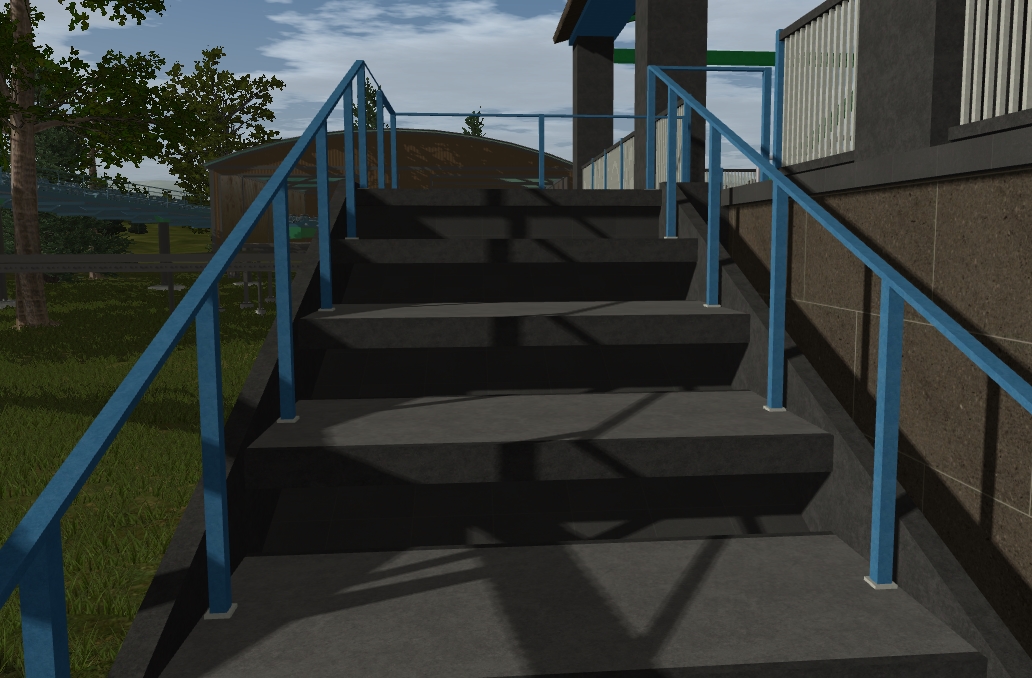
My hunch was right. Swapped the texture and now everything appears to be fine.
October 31st, 2015, 7:08 am

October 31st, 2015, 10:44 am
October 31st, 2015, 12:43 pm
October 31st, 2015, 12:56 pm
New Sketchup export issue
7 posts
• Page 1 of 1
October 31st, 2015, 12:33 am
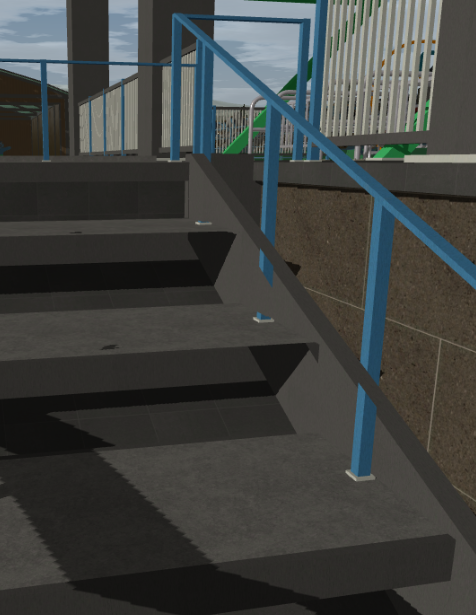
I haven't used NL2 in a while but I discovered this is happening post-patch. You can see far parts of the rail showing through the closer pieces. Anyone have any suggestions?
My Channel has a Facebook! https://www.facebook.com/GreenBulletProductions
October 31st, 2015, 12:51 am
Actually I think this is being caused by the texture I'm using. I changed the metal textures to nothing but solid colors by editing the .png files sketchup exports and now it's no longer doing it.
Looks like I gotta find a new texture or use my old one. I'd prefer not to use the old one since it becomes repetitive.
Looks like I gotta find a new texture or use my old one. I'd prefer not to use the old one since it becomes repetitive.
My Channel has a Facebook! https://www.facebook.com/GreenBulletProductions
October 31st, 2015, 1:10 am
My hunch was right. Swapped the texture and now everything appears to be fine.
My Channel has a Facebook! https://www.facebook.com/GreenBulletProductions
October 31st, 2015, 7:08 am

All apart from the underside of this railing:
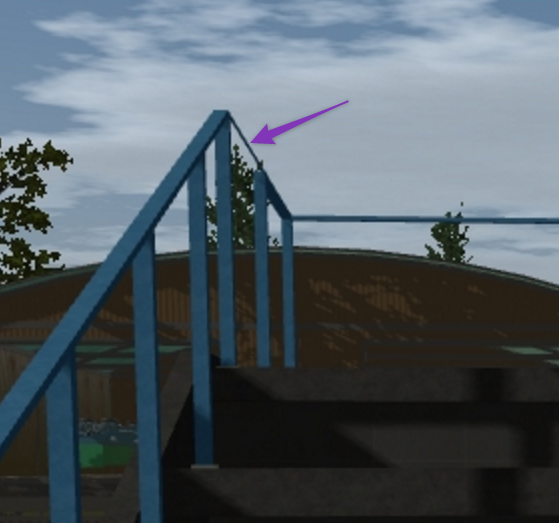
Possibly the back-face showing, which might need flipping. Looks good otherwise!
Possibly the back-face showing, which might need flipping. Looks good otherwise!
October 31st, 2015, 10:44 am
I checked the entire model before posting the topic to make sure no faces were like that. I noticed it was only happening when one metal texture intersected another. Changing the texture solved the issue. I'm keeping this topic available in case anyone else has the same issue.
My Channel has a Facebook! https://www.facebook.com/GreenBulletProductions
October 31st, 2015, 12:43 pm
I just use supports and free nodes and never worry about missing or reversed faces ever.
October 31st, 2015, 12:56 pm
This model will use support nodes in some spots actually. A first for me.
My Channel has a Facebook! https://www.facebook.com/GreenBulletProductions
7 posts
• Page 1 of 1
Return to 3D Modeling Discussion
-
- Related topics
- Replies
- Views
- Last post
-
- My sketchup item is not showing up
by Jordan030225 » January 16th, 2015, 6:25 pm - 4 Replies
- 1453 Views
- Last post by Jordan030225

January 17th, 2015, 9:34 am
- My sketchup item is not showing up
-
- Can someone export a Sketchup file
by mugglewayne » August 21st, 2014, 10:21 am - 0 Replies
- 1190 Views
- Last post by mugglewayne
August 21st, 2014, 10:21 am
- Can someone export a Sketchup file
-
- sketchup textures missing
by King_nelly » September 19th, 2015, 10:34 am - 6 Replies
- 2762 Views
- Last post by mkingy
September 23rd, 2015, 12:08 pm
- sketchup textures missing
-
- Blender export problem
by mijke » December 10th, 2014, 3:30 pm - 3 Replies
- 2141 Views
- Last post by Coaster Mind
February 16th, 2015, 12:53 am
- Blender export problem
-
- Problems with imports with sketchup 7
by dlrrigo » January 19th, 2012, 5:42 pm - 3 Replies
- 1849 Views
- Last post by dlrrigo
January 19th, 2012, 7:09 pm
- Problems with imports with sketchup 7