Board index Roller Coaster Games 3D Modeling Discussion 3ds Got Inside-Out After Anim8or

3ds Got Inside-Out After Anim8or

Discuss anything related to 3D modeling from 3ds Max to Object Creator. Have a question? Get it answered here!

Post January 20th, 2012, 10:17 am

Posts: 568
Points on hand: 1,566.00 Points
Location: Hangzhou, Zhejiang, China
Offline
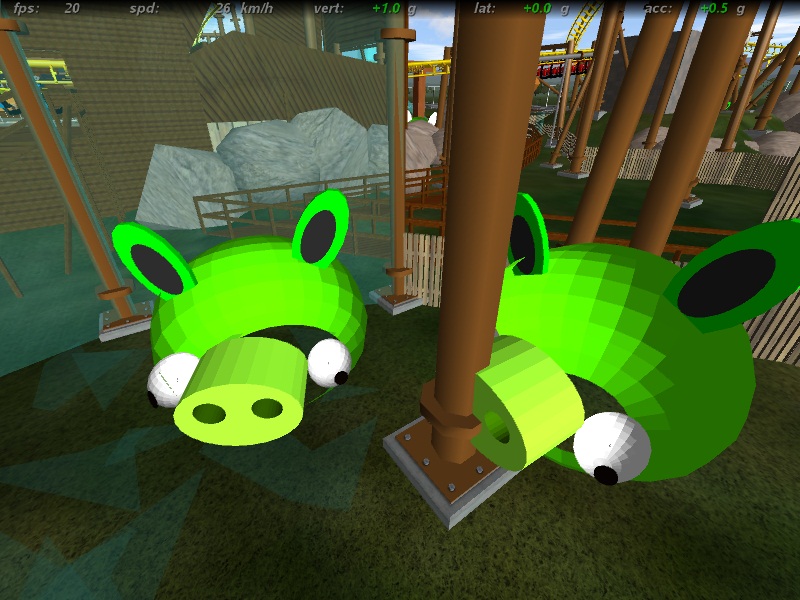
I??????????????????m Working on my Project Angry Birds ??????????????????Needs some Green Pigs ??????????????????But After Tweak??????????????????the model become Inside Out????????????????????????????????????


Image Insert:
Image
166.92 KB

Post January 20th, 2012, 7:53 pm

Posts: 1241
Points on hand: 95.00 Points
Bank: 2,503.00 Points
Location: Kentucky
Offline
Were those models made in SketchUp? You could try reversing the faces.

(Right-click on a face, press "Reverse Face".)

Post January 21st, 2012, 9:52 am
AyTrane Premium Member
Premium Member

Posts: 334
Points on hand: 2,132.00 Points
Location: USA
Offline
Sometimes just re-inserting the object will fix this issue.

Post January 21st, 2012, 6:28 pm
Goku1910 User avatar
Premium Member
Premium Member

Posts: 486
Points on hand: 2,514.00 Points
Bank: 2,212.00 Points
Location: USA
Offline
okay, in sketchup go to Face Style> And switch to Monochrome. This will show the faces with no textures (white and dark side) All the sides that are visible need to be WHITE. If not, reverse them. Then switch back to "Shaded with Textures" and re-paint the revered faces.

Sponsors
Did you know? Active community members enjoy an ad-free experience! Learn how ›
  • Rate 80%+ of your downloaded tracks (min 40 downloads)
  • Post at least 10 forum topics or replies in the last 90 days
  • Upload a track in the last 90 days
  • Earn 50,000+ points with a 10+ year account
  • Or become a Premium member

Return to 3D Modeling Discussion