
 Home
Home Contact Us
 Discord
 Chat [0]
 Store
Store Exchange
 Forum
Forum
Board index ‹ Off Topic Board ‹ Off Topic Discussion ‹ Can't find screenshots in screehshots folder.
 April 6th, 2011, 6:39 pm
my Last coaster : NLT2011 round2 => MaDcAt (NoLimits) MINECRAFT ADDICTED
I swear I do this daily.
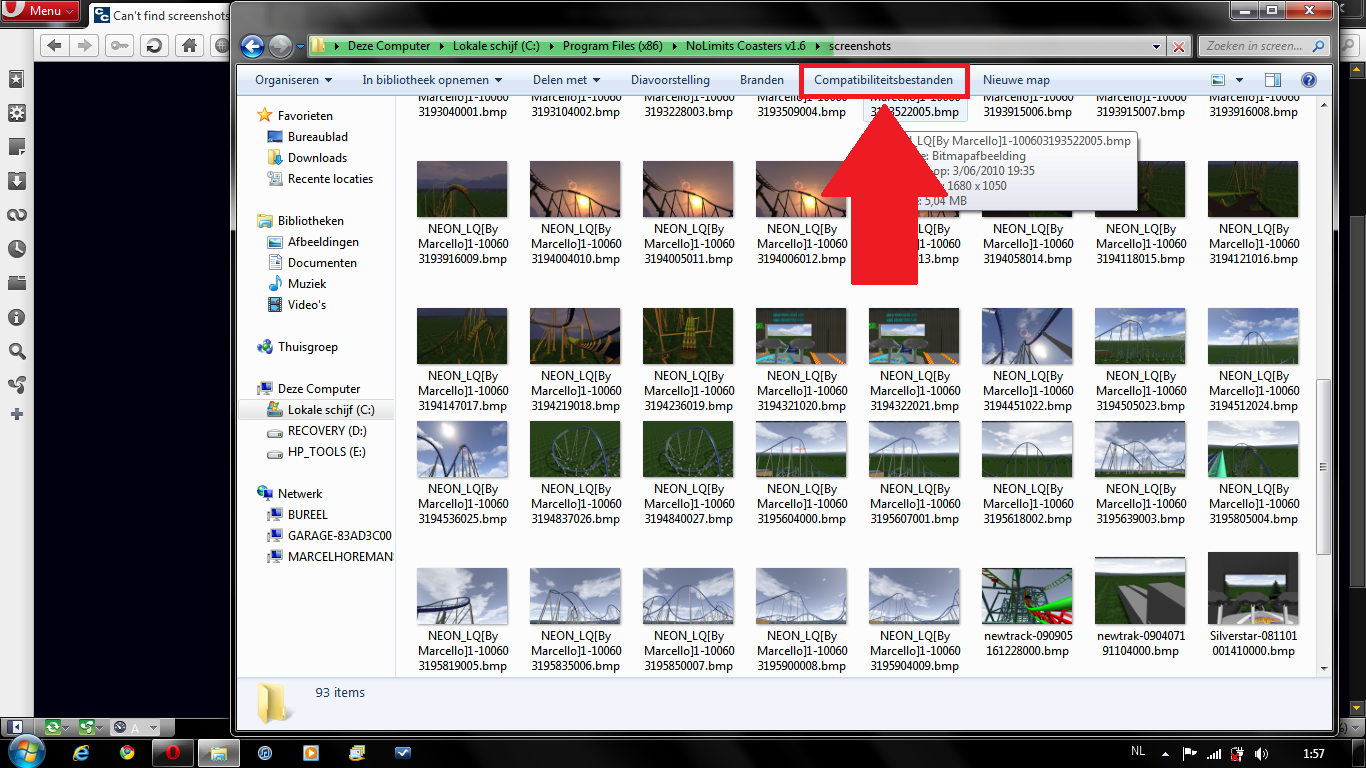
Open the Windows Explorer (file finder). This beginning step is critical because if you press "Browse" on an image uploading site, the button will not appear. Go to the folder where the screenshots should be. The "Compatibility Files" button should be there. Click it, highlight all the photos, CUT, press BACK, then PASTE.
Now press "Browse" on your image uploading site, and they should be there.
Windows Vista/7 "help-from-AJ" topic #1 (Compatibility Files)
issued to 2,658,934 members as of Wednesday, April 06, 2011
This is the story of my life.
...

[reused]
Back on topic. Yes i have windows 7. Do you have 64bit or 32bit ?
Edit.:
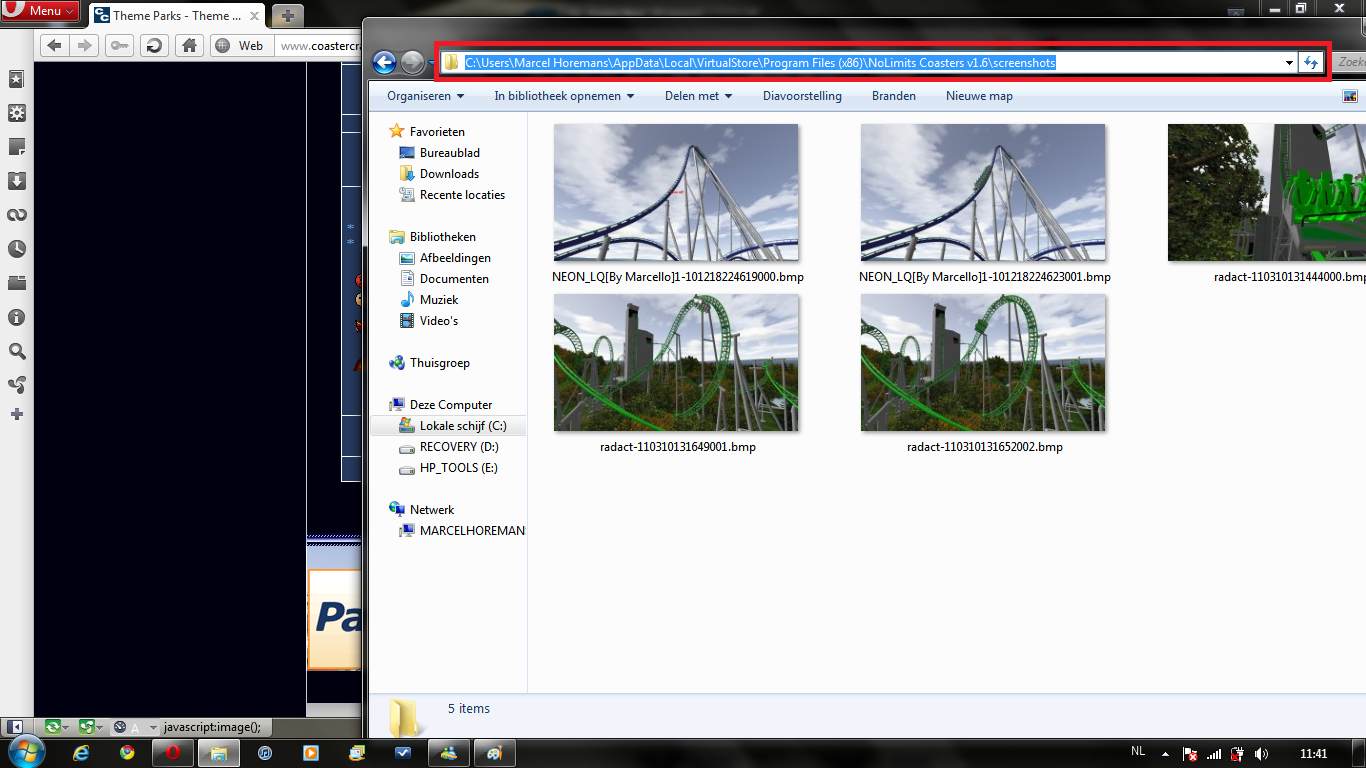
If you have 32bit: go to here:
C:\Users\[Your user name]\AppData\Local\VirtualStore\Program Files\NoLimits Coasters v1.6\screenshots
64bit:
C:\Users\[Your user name]\AppData\Local\VirtualStore\Program Files (x86)\NoLimits Coasters v1.6\screenshots
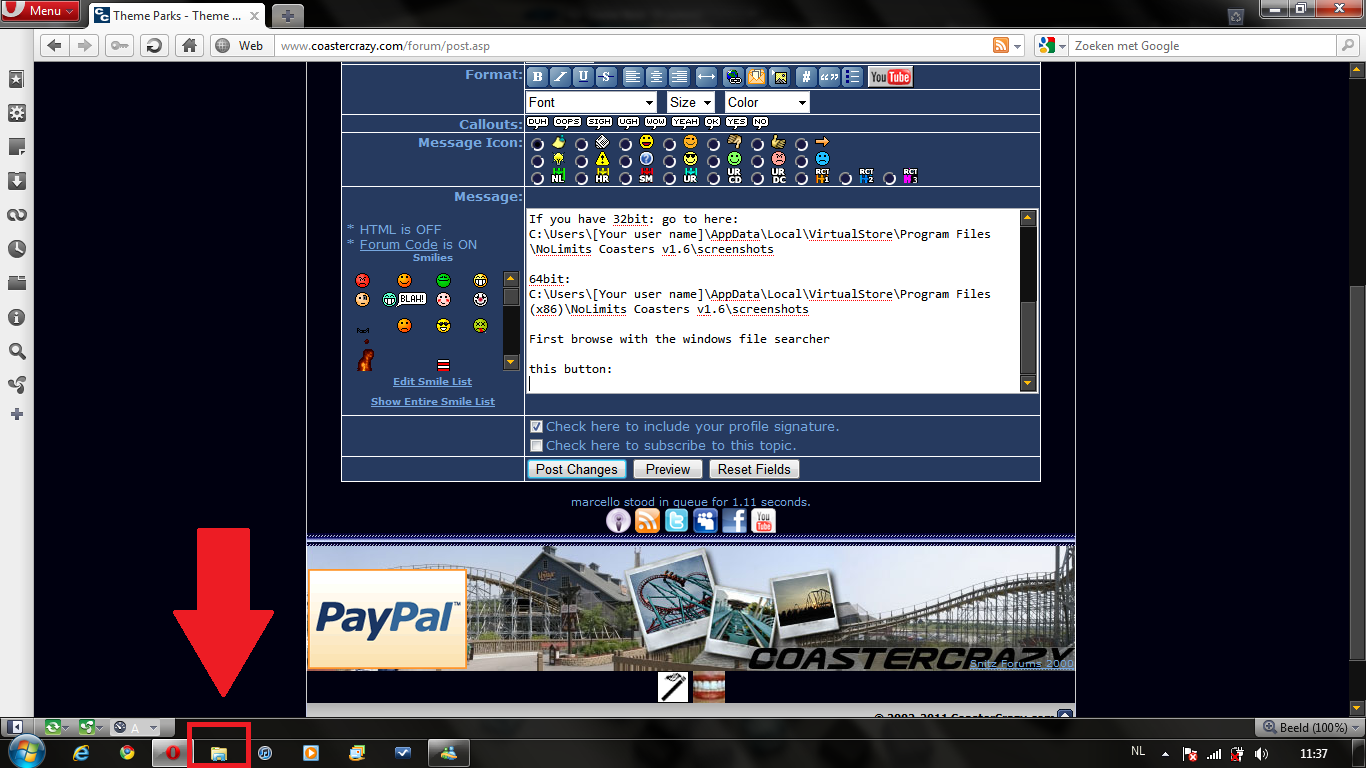
First browse with the windows file searcher
this button:
Image Insert:
338.06 KB
This is the address field i said:
Image Insert:
491.44 KB
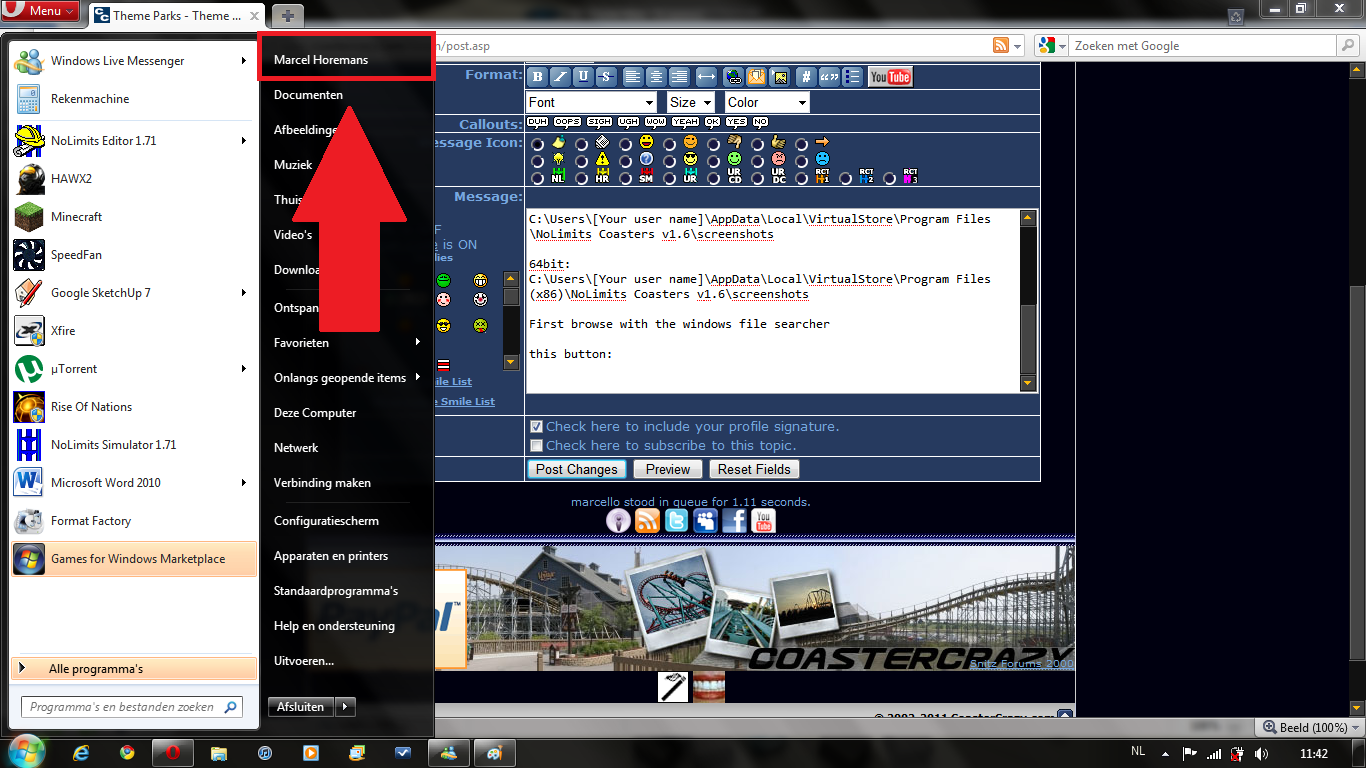
And this is "your username" type it in the correct fields i said:
Image Insert:
417.39 KB
my Last coaster : NLT2011 round2 => MaDcAt (NoLimits) MINECRAFT ADDICTED
my Last coaster : NLT2011 round2 => MaDcAt (NoLimits) MINECRAFT ADDICTED
Turn on the light in your room

Can't find screenshots in screehshots folder.
20 posts
• Page 1 of 1
April 6th, 2011, 6:39 pm
My image shack folder says it is 0 bytes and has 0 space on the hard drive. I try to view it as a list, details,titles and content. Nothing come up ether way I view it. Is it because I have windows 7? I want to upload a picture of my Kick It In The Backseat jet coaster and future pictures. Is windows 7 hiding the screen shots somewhere else on my computer?

Use the compatibility button.
Here:
Image Insert:
448.66 KB
Here:
Image Insert:
448.66 KB
Mine doesn't seem to have a compatibly button visible. Does marcello have windows 7?


Posts: 14428
Points on hand: 1,062.60 Points
Bank: 187,052.60 Points
Location: California, USA
Steam: sleaklight
Offline
Steam: sleaklight
Offline
Check your back pocket.
Support Us! - Click Here To Donate $5 Monthly!
Paradox wrote:
No need to tell Oscar about the problems. He is magic.

Originally posted by cool5
Mine doesn't seem to have a compatibly button visible. Does marcello have windows 7?
Mine doesn't seem to have a compatibly button visible. Does marcello have windows 7?
I swear I do this daily.
Open the Windows Explorer (file finder). This beginning step is critical because if you press "Browse" on an image uploading site, the button will not appear. Go to the folder where the screenshots should be. The "Compatibility Files" button should be there. Click it, highlight all the photos, CUT, press BACK, then PASTE.
Now press "Browse" on your image uploading site, and they should be there.
issued to 2,658,934 members as of Wednesday, April 06, 2011
This is the story of my life.
...
Go into C:/Program files/No Limits Coaster 1.6/Screenshots
[19:34:14] RideWarriorNation: jim
[19:34:27] RideWarriorNation: can you pls change sig
[19:35:22] Jcoasters: ok
[19:35:39] RideWarriorNation: ty
[19:34:27] RideWarriorNation: can you pls change sig
[19:35:22] Jcoasters: ok
[19:35:39] RideWarriorNation: ty
^[irate]

^ Calm down, hes just the new site idiot. They say dumb stuff some times.
Me or cool5?
[19:34:14] RideWarriorNation: jim
[19:34:27] RideWarriorNation: can you pls change sig
[19:35:22] Jcoasters: ok
[19:35:39] RideWarriorNation: ty
[19:34:27] RideWarriorNation: can you pls change sig
[19:35:22] Jcoasters: ok
[19:35:39] RideWarriorNation: ty
Originally posted by Tetsu
^ Calm down, hes just the new site idiot. They say dumb stuff some times.
^ Calm down, hes just the new site idiot. They say dumb stuff some times.
[reused]
Or you your UAC off before installing Nolimits and you never have to worry about this
Rarwh
Originally posted by cool5
Mine doesn't seem to have a compatibly button visible. Does marcello have windows 7?
Mine doesn't seem to have a compatibly button visible. Does marcello have windows 7?
Back on topic. Yes i have windows 7. Do you have 64bit or 32bit ?
Edit.:
If you have 32bit: go to here:
C:\Users\[Your user name]\AppData\Local\VirtualStore\Program Files\NoLimits Coasters v1.6\screenshots
64bit:
C:\Users\[Your user name]\AppData\Local\VirtualStore\Program Files (x86)\NoLimits Coasters v1.6\screenshots
First browse with the windows file searcher
this button:
Image Insert:
338.06 KB
This is the address field i said:
Image Insert:
491.44 KB
And this is "your username" type it in the correct fields i said:
Image Insert:
417.39 KB
This is not the no limits screen shot folder this is the Image Shack Quick Shot screen shot folder.
^So that's different? If it's on your computer, and it's not showing up, then it's Compatibility Files.
And, if you just took the screenshots, then they ARE in your screenshots folder. They go there until you move them to your Image Shack folder.
And, if you just took the screenshots, then they ARE in your screenshots folder. They go there until you move them to your Image Shack folder.
You can't see any files without the compatibility file button because nolimits doesn't save your files in the screen shots folder, it saves them in the compatibility section of your pc.
Cool5: just let somebody fix it for you: teamviewer for example (people can safely control your pc when you watch and if they do something you don't like, you can take control again)
Just ask: can somebody help me... [;)]
Cool5: just let somebody fix it for you: teamviewer for example (people can safely control your pc when you watch and if they do something you don't like, you can take control again)
Just ask: can somebody help me... [;)]
I tried to take a screen shot but got a black picture for some strange reason.
Image Insert:

2.73 KB
Image Insert:
2.73 KB

Sorry for digging this up, but, I am having a similar problem, only, with track files. I tried going into the compatibility files and moving them, but, I keep getting an error message saying path and destination are the same so I cannot use this method. Any thoughts?
"if you found your laughin' place, how come you ain't laughin'."https://www.facebook.com/calicoaster1/

Originally posted by cool5
I tried to take a screen shot but got a black picture for some strange reason.
Image Insert:
2.73 KB
I tried to take a screen shot but got a black picture for some strange reason.
Image Insert:
2.73 KB
Turn on the light in your room
Coastercount: 1410 (I've seen the world and it's horrid contraptions... @.@)
- Wood: 142
- Steel: 1268
- Wood: 142
- Steel: 1268

20 posts
• Page 1 of 1
Return to Off Topic Discussion
-
- Related topics
- Replies
- Views
- Last post
-
- Deleting csc offline folder.
by dj-dj » October 12th, 2007, 4:58 pm - 1 Replies
- 943 Views
- Last post by gouldy

October 13th, 2007, 9:35 am
- Deleting csc offline folder.
-
- Where to find glass insulators?
by cool5 » August 19th, 2010, 11:54 am - 0 Replies
- 936 Views
- Last post by cool5
August 19th, 2010, 11:54 am
- Where to find glass insulators?
-
- Youtube find... (No crap involved)
by RRollergod » October 12th, 2007, 5:48 pm - 7 Replies
- 1548 Views
- Last post by Casper
October 12th, 2007, 7:06 pm
- Youtube find... (No crap involved)
-
- help me find a meaning to a dream
by gazag » August 26th, 2010, 6:50 pm - 19 Replies
- 2912 Views
- Last post by Coasterkidmwm
August 30th, 2010, 12:47 am
- help me find a meaning to a dream
-
- Classic LOTR parody videos, find em' and post em'!
by Tidus » September 11th, 2009, 1:54 pm - 0 Replies
- 686 Views
- Last post by Tidus
September 11th, 2009, 1:54 pm
- Classic LOTR parody videos, find em' and post em'!